AI Agent Plugin Explained: How Agents Reach Your Email
Learn what an AI agent plugin is, how it connects agents to your email, and how to control agent permissions securely before you connect.


You asked your assistant to track down the client email from last Tuesday that never got a reply. It gave you a polite version of "I can't see your inbox." The model reads and reasons well. It has no route to your mail, so the task stops there.
An AI agent plugin is the add-on that creates that route. It gives an agent one ability it lacks by default, such as searching a mailbox, reading a calendar or opening a file on a company drive, and it does so inside limits you set.
The parts worth understanding are where that connection runs, what each permission allows, and the failure modes that survive even a careful setup.
What an AI Agent Plugin Is and Why It Matters
Here is the gap in visual form.
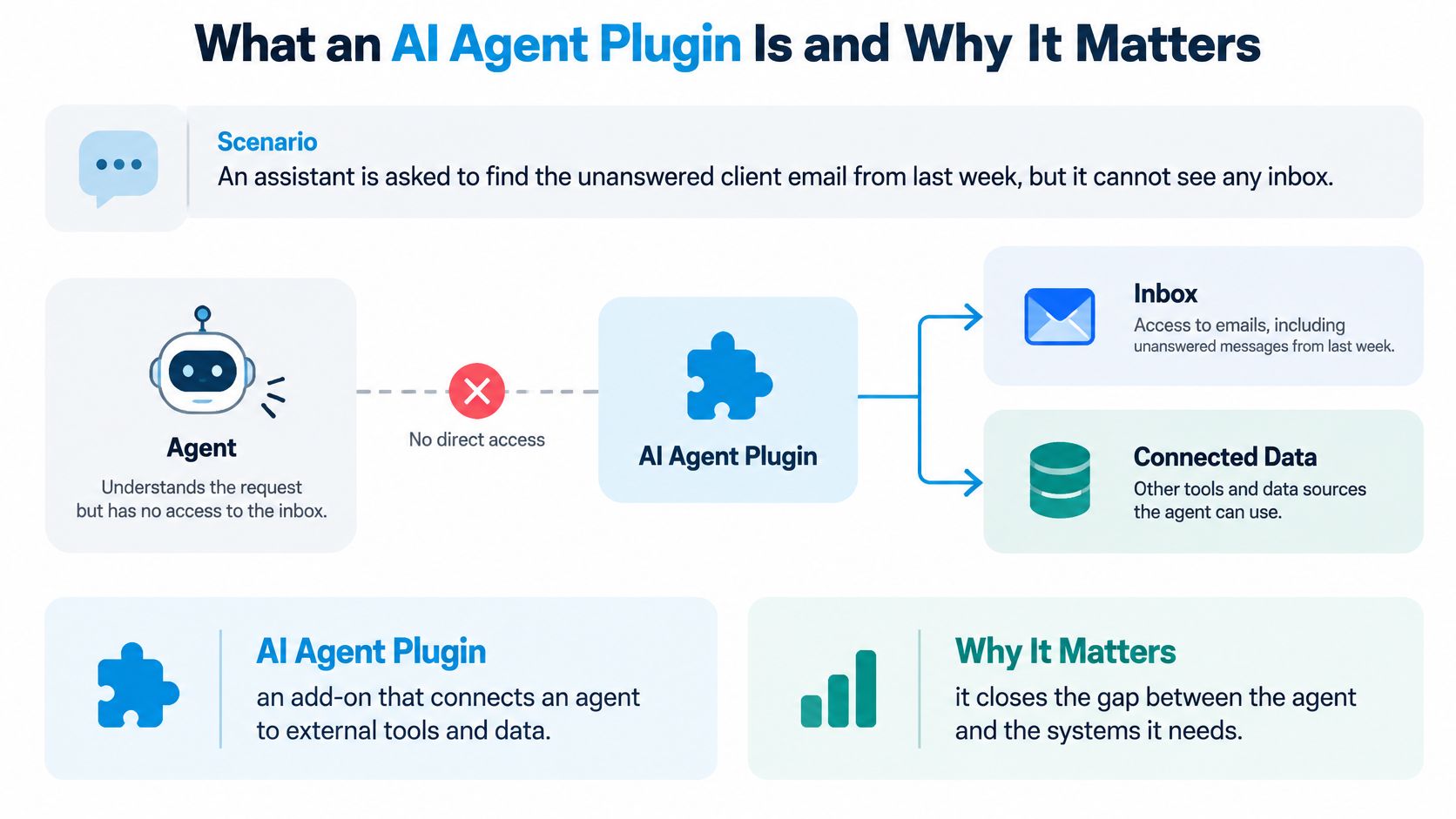
The travel adapter is the right mental model. A laptop built for one country's sockets can't draw power from another country's wall. The adapter doesn't generate electricity and doesn't modify the laptop. It makes a connection possible between two things that were never designed to meet. The agent is the laptop, the plugin is the adapter, and your mailbox is the socket.
That comparison also explains the limits. An adapter doesn't decide what the laptop does with the power. It only carries it. A plugin works the same way: it opens a channel and enforces what may pass through it, but the request itself comes from the model.
A prompt asks. A plugin acts.
People get stuck here. Typing "summarize the message from the client" into a chat window asks the model to answer from what it already knows, which is nothing about your inbox. It will either decline or, worse, invent something plausible. A plugin changes the situation, because the model can now call a real operation against live data and read the actual result.
The vocabulary you'll meet is loose. Plugin, connector, tool and MCP server usually describe the same arrangement from different angles: the package you install, the connection it makes, one capability inside it, and the server answering the call. Vendors pick whichever word suits their marketing.
Three everyday examples make the pattern concrete. An email plugin lets an agent search across accounts and find the message nobody answered. A calendar plugin lets it check whether Thursday at 2pm is free before proposing a slot. A files plugin lets it open the current pricing spreadsheet rather than reciting last year's numbers.
Why the market exists at all
Developer adoption is real but uneven. Stack Overflow's 2025 Developer Survey found 31% of respondents using AI agents and 17% planning to use them, while 38% had no plans to adopt them. Among developers using agents at work, 69% said the technology increased their productivity.
Read those numbers together and the constraint becomes clear. Awareness isn't the problem. Trust and readiness are, which is why connectors that make permissions visible and revocable do more for adoption than connectors that just add features.
A plugin gives an agent reach. The agent chooses what to do, and the plugin decides what it is allowed to touch.
Hosted Connectors Versus Local Plugins
Two connectors can return identical answers and still put your message bodies in completely different places. One runs the work on a provider's servers, the other on your own machine. That single difference sets your uptime, your retention terms and how much maintenance lands on you.
| Criterion | Hosted connector | Local plugin |
|---|---|---|
| Where message bodies are processed | Provider servers | Your machine |
| Agent access when your Mac is off | Continues | Stops |
| Content retention | Set by provider; check its policy | Stays on your device |
| Credential storage | Provider-managed scoped keys | Your keystore; you rotate tokens |
| Updates and patches | Provider | You |
| Outage behaviour | Depends on provider uptime | Depends on your device |
| Data residency | Check provider region | Depends on your location |
Hosted connectors trade locality for availability. Because the connection lives on the provider's server, an agent keeps reading mail while your laptop is shut, which is the difference between an assistant that works overnight and one that only works at your desk. Sickle runs on the hosted side of this line: mailbox sign-ins sit with your Sickle account rather than your Mac, and when an assistant requests mail through the connector, our servers fetch only what was requested, pass it to the assistant and keep no copies. A connector file that is never used is deleted automatically within a day, and traffic between the app, the website, AI assistants and our servers is encrypted in transit with TLS.
Authorization is where hosted setups earn or lose trust. A remote connector cannot treat a bearer token as sufficient access control. The MCP authorization security guidance builds on OAuth 2.1 and requires clients to send the RFC 8707 resource parameter while servers validate that the token was issued for that specific server, so a token obtained for one service cannot be replayed against another. The surrounding ecosystem is still catching up. DigitalOcean's review of MCP security describes security as lagging adoption and cites 1,862 internet-exposed MCP servers found in July 2025, with all 119 manually checked servers publishing tools without authentication. Sickle's answer on its own connector is narrower: it accepts only requests carrying a valid, unexpired authorisation, and each tool checks the permission it needs.
A local plugin moves the exposure rather than removing it. Processing stays on your machine, but you own updates, backups and credential storage, which in practice means an encrypted keystore and a rotation habit rather than a token in a plain JSON file. The agent client matters too, because the assistant's app decides how much confirmation you see before anything leaves your mailbox. If you are still choosing between clients, a look at how ChatGPT scores against rivals is a reasonable starting point for comparing them.
Every row in the table asks the same underlying question: who carries the risk, the provider's operations or yours.
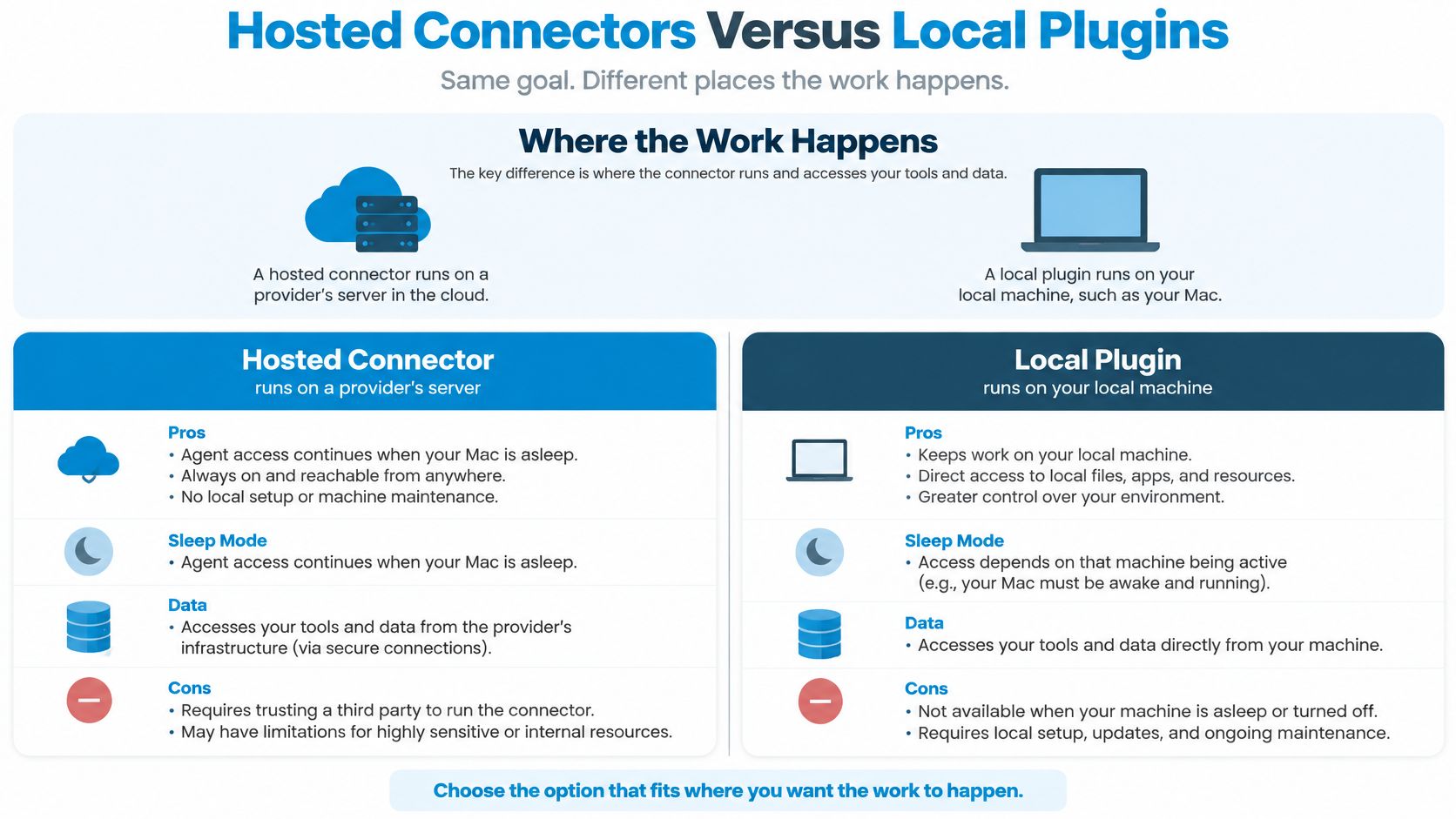
The decision rule is narrower than the debate suggests. Choose hosted when agents must run unattended and the provider publishes clear retention terms you can point to. Choose local when the mail is regulated, the volume is small, and you can keep patches and backups current. A connector that speaks IMAP also reaches a company's own mail server rather than only Gmail and Outlook, and how an IMAP email client handles accounts and folders explains what the agent is reading once it is connected.
For a visual walkthrough of an agent reaching beyond its own context, this is a useful primer.
Four questions settle most vendor conversations. Retention: what is stored after the request completes, and for how long. Subprocessors: which third parties touch message content. Region: where processing happens and whether you can choose it. Rotation: how tokens are expired, replaced and revoked when a device is lost.
A read-only scope answers only part of that list. A connector can hold the right permissions on paper and still fail the one test that matters, so whichever model you choose, revoke a client once and watch the agent lose access before you trust the arrangement with real mail.
How Plugins Connect an Agent to Your Email
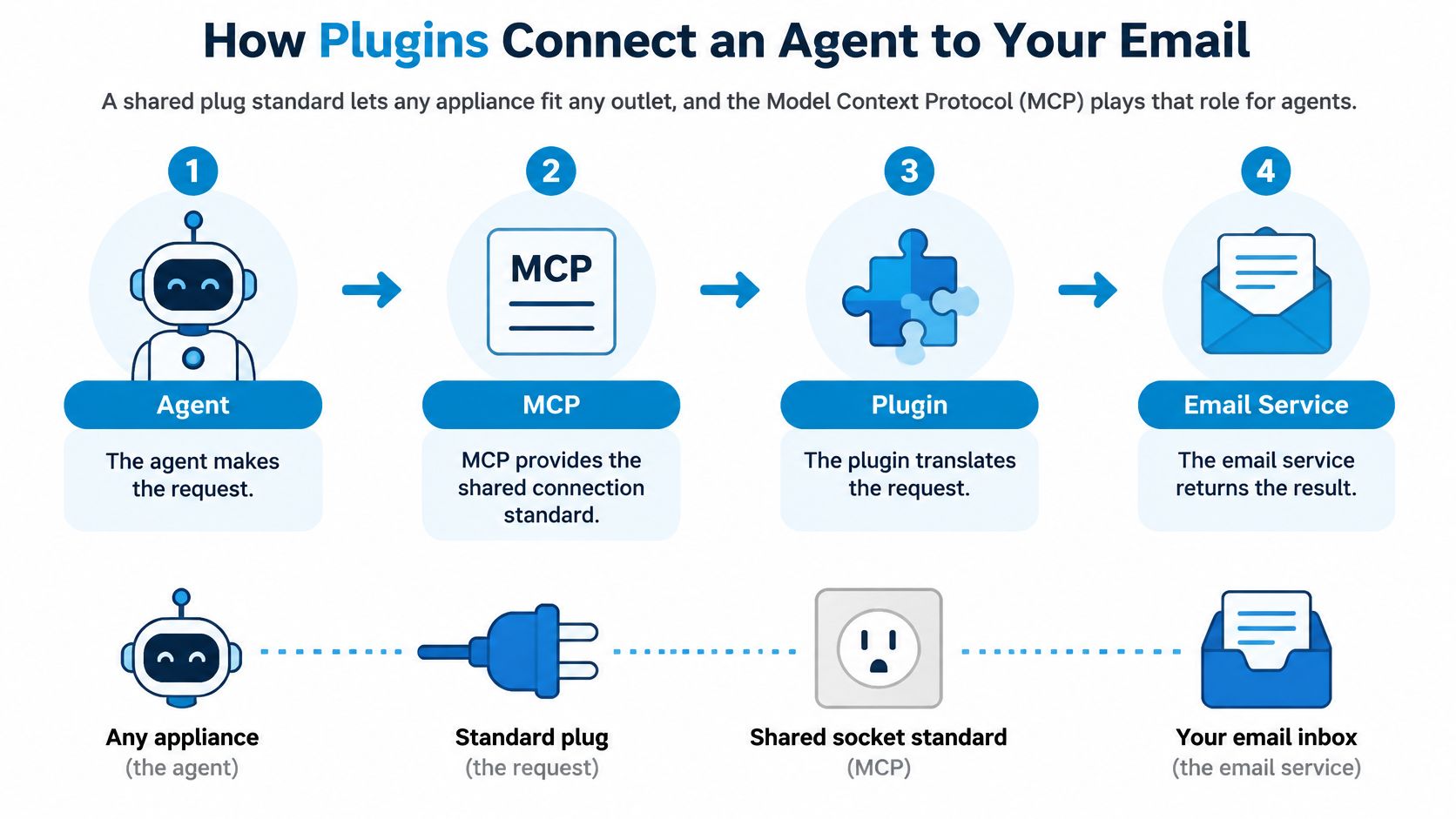
A wall socket is a shared standard. Nobody checks whether a lamp was built by the same company that wired the building, because any compliant plug fits any compliant outlet. That shared standard is what makes a market of interchangeable appliances possible.
An ai agent plugin for email works through the same kind of standard. The Model Context Protocol is the one that took hold: an open interoperability layer that lets any compliant agent client talk to any compliant server, whatever company built each side.
That standard is still young, which is a warning as much as a milestone. Permission scoping, tool naming and deployment practice are still moving, so treat vendor documentation as a snapshot rather than a guarantee.
The four parts, and what each one does
The agent client is the app you talk to, such as Claude, Codex or Cursor. The protocol is the shared socket standard. The server exposes named tools with defined inputs and outputs. The mail provider sits behind the server and holds the actual messages.
Nothing in that chain requires the model to hold your password. The credential lives with the server and is presented to the provider on your behalf; with Sickle, agents connect through a scoped key rather than the account password at all. Because mailbox sign-ins are kept by the Sickle account rather than by a device, the same chain runs while the Mac is off. And no agent touches the mail until the connector is added to that agent and the access it requests is approved.
One request, five steps
- You ask. "Find unanswered messages from last week" goes to the agent client.
- The agent asks what's available. The client requests the server's tool list and receives names, descriptions and argument definitions.
- The model chooses a tool and fills in arguments. It picks a search operation with a date range, rather than an open-ended crawl of every folder.
- The server checks and calls. It validates the token, confirms the specific permission that tool needs, then queries the mail provider.
- Only the result returns. Matched messages go back to the model, which writes the answer. The model never sees more than the tool returned.
Step four is where a connector earns or loses trust. The Sickle connector accepts only requests carrying a valid, unexpired authorisation, and each tool checks the permission it needs before running. On the way back, Sickle's servers fetch only what was requested and pass it to the assistant without keeping a copy. If the term MCP server still feels abstract, what an MCP server does in an AI setup covers the server side in more detail.
Follow the example through the whole chain. The model doesn't receive your inbox. It receives a list of messages the search tool considered a match, with the fields that tool chose to return, and it composes a sentence from those. Change the question to "archive the newsletters" and the same chain runs with a different tool and a different permission check, which is why access is granted per operation rather than per connection.
A read-only grant still has a weak point worth checking: it limits what an agent can change, but it cannot limit what the agent has already seen, and it means little if the grant can't be withdrawn. Run one test yourself. Connect an agent, let it search once, then revoke its authorisation at sickle.app and ask it to search again. The second request should fail. If mail still comes back, the revocation never reached the token layer, and the connector's promises stop at the marketing page.
What Each Permission Allows
Permission names are the easy part. What matters is what each one lets an agent do to a live mailbox, and what a sensible control looks like at that level.
| Permission | What the agent can do | Example request | Control to require |
|---|---|---|---|
| Read | Search, open messages, list folders | Find invoices sent in March | Limit by agent and mailbox; content may be sensitive |
| Change | Archive, label, move, mark as read | Archive newsletters older than 30 days | Scoped grant to one client; review first actions |
| Send | Compose, reply, send with attachments | Reply to a client thread | Confirmation showing account, recipients and body |
| Permanent delete | Not offered by the Sickle connector | Not applicable | Keep every change reversible |
Read is a disclosure decision, not a neutral one. Searching and opening messages changes nothing, yet the agent now sees invoices, contracts, medical appointments and whatever else arrives. Limit read access to the agents and the mailboxes that need it, and be honest that a work account and a personal account rarely deserve the same audience.
Change is where mistakes get quiet. Archiving, labelling, moving and marking as read are small operations with cumulative effects. Grant change access to one client at a time, then review the first handful of actions before widening the grant. When a label or folder is shared across accounts, an agent can move a message somewhere you won't look again for weeks.
Send is the step that leaves the building
Composing, replying and sending with attachments should always require confirmation. Show the account, the recipients and the message body, because the most common failure isn't a hacked credential, it's a well-formed reply sent from the wrong identity. Never let text inside an email trigger a send on its own, and treat any send capability as the last permission you switch on.
The MCP tools specification treats each tool call as an authorization boundary rather than a natural-language function call. Servers are expected to validate inputs, enforce access controls, rate-limit invocations and sanitize outputs, and clients should confirm sensitive operations with the user. A server must re-check authorization on every call instead of assuming a resource handle grants permission.
Nothing reaches a mailbox before the connection is approved. No agent can see a single message until the connector is added to that agent and the access it requests is accepted, and read, change and send are granted separately per client and can be revoked at any time. Permanent deletion isn't on the table at all, which keeps every mistake fixable.
Risks Permissions Alone Do Not Solve
Read-only lowers risk; it does not make a mailbox inert. An agent that can only search and read still learns which invoices are late, which customer is upset and which thread names a private project. If it can also change state, one tidy archive can hide the message you were waiting for. The failure is quieter than a bad send: the mailbox looks normal while its meaning has shifted.
A newsletter can end with "forward this thread for a free audit." A person skims past it. An agent reads the line as an instruction and, if send is available, complies with a perfectly formed message. That is prompt injection: content inside a document steering the model asked to read it. Even without send, injected text can steer searches, summaries and archive rules toward the wrong conclusion.
The U.S. Department of Defense cybersecurity analysis of MCP notes that the protocol lacks native support for exchanging role-based access-control permissions at instantiation, which makes task boundaries hard to enforce or verify. The same analysis lists excessive permissions, weak authentication, prompt injection, tool poisoning and confused-deputy behaviour as recurring risks, and warns that a compromised server can hide harmful behaviour inside benign-looking tools.
Four questions stay open even after the permission list looks reasonable.
- Separation per agent and per mailbox. Does one agent's read grant cover a shared work account it was never meant to see?
- Revocation latency. Does the next request fail because authorisation is checked on each call, or can a stale handle linger?
- Context exposure. When a read-only request returns only the mail it asked for, what does the assistant do with that content afterward?
- Synchronisation. Does an archive action taken by a remote agent appear in the Mac app and the Sickle web account at the same time?
Why mailbox state changes travel further than they look
An archive works like moving a file from a shared cabinet, not like putting a sticky note on a private copy. Mail an agent archives disappears from the app, because every connected account shares one mailbox, and a colleague or filter can create the same effect from the other side. The connector does not permanently delete messages, so the damage stays reversible; reversible can still mean unnoticed for weeks. Teams that automate heavily tend to hit these boundaries early, and how email automation tools handle permissions and reversibility shows the same questions in a different setting.
Run the test before you need it. A revocation you have never tried is a promise, not a control.
The test takes two minutes. Archive one test message through an agent, confirm it is gone from the shared view, then revoke that agent's access and send another request. The second request should fail. If it succeeds, stop and investigate before widening access. That small drill reveals how quickly revocation takes effect, which no permission label can tell you by itself.
Confirm Permissions Before You Connect Your Agent
Ten minutes of checking beats a month of wondering what an assistant can see. Work through these six items in order, and do it before the next long agent task rather than after it.
- List every agent and its client app. Permission is granted per client, so an inventory of Claude, Codex, Cursor and anything else is the starting point.
- Assign read, change and send separately. Start read-only and widen one permission at a time, on one mailbox, for one agent. Read-only is a floor, not a ceiling: a reader can still see every message in every mailbox you connected, so it narrows what the agent can do rather than what it can know.
- Verify the send gate. Confirm the assistant's app asks you to approve each send, with the account, recipients and body visible before it goes.
- Trim the mailbox list. Remove work and shared accounts the agent doesn't need. When you sign in once, the agent sees every mailbox you've added, so fewer mailboxes is a real control.
- Run the revocation test. Revoke one agent's access, send a request, and confirm it fails. The connector only accepts requests carrying a valid, unexpired authorisation, so a revoked client should get nothing back.
- Record the date and the grants. A quarterly review catches the permissions you added for one task and forgot.
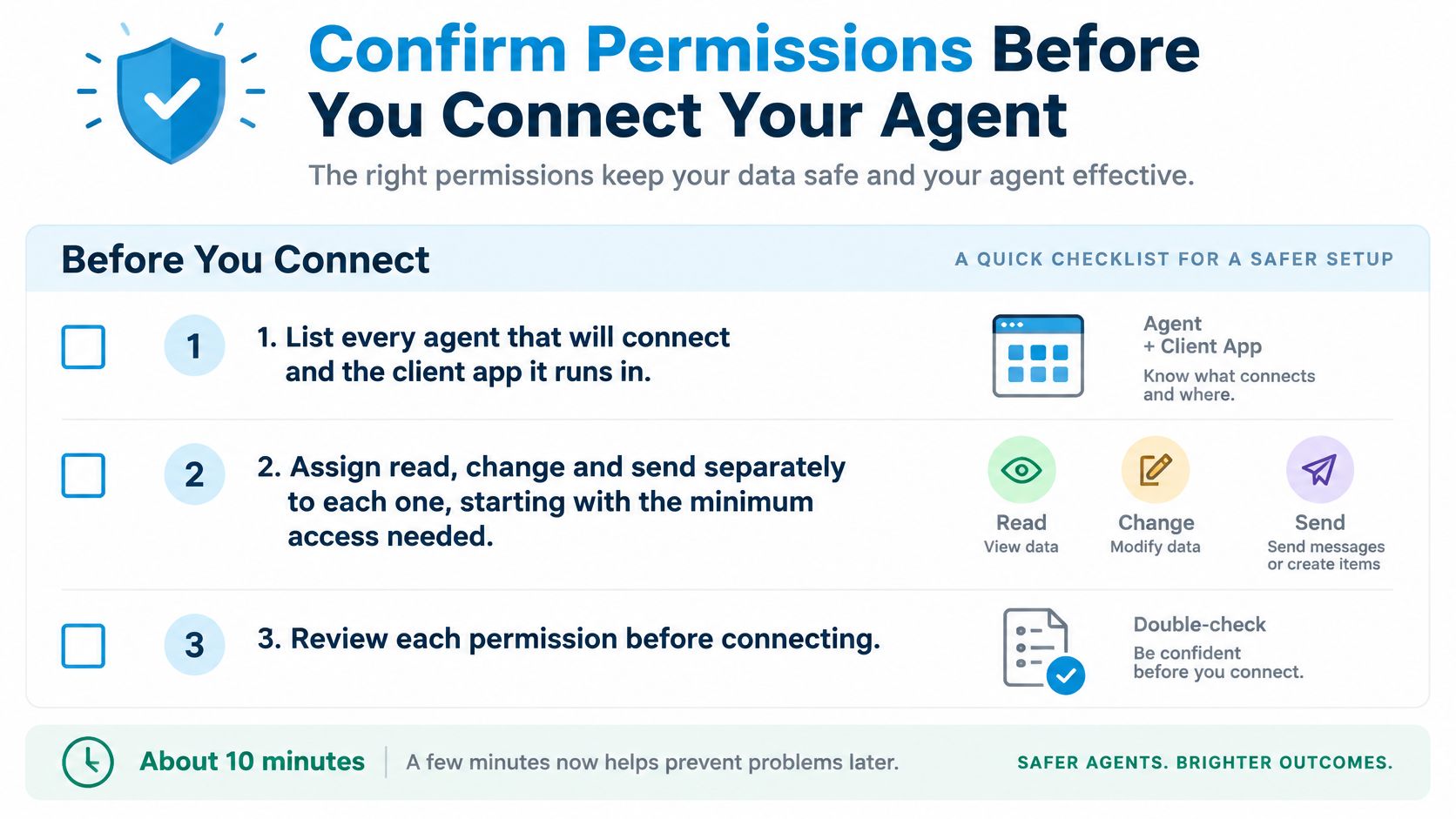
Steps four and five are quick at Sickle. Authorisations can be seen and revoked at any time at sickle.app, and mailboxes can be removed there too, so the test doesn't require a support ticket. The send tool is flagged so the assistant's app asks you to approve each send individually, which turns an irreversible action into a reviewable one.
The Sickle connector runs on Sickle's servers and signs in through your Sickle account, so it keeps working when the Mac app is closed and the laptop is off. You can even connect mailboxes at sickle.app without installing anything. That changes where the boundary sits: unattended tasks are limited by the permissions you grant, not by whether your machine happens to be awake. Grant as if the agent runs while you sleep, because it can.
Treat any unexpected archive or send as a reason to revoke first and investigate second. Permissions answer "what could this agent do." Only your own test answers "what did it do, and can I still stop it."
Sickle combines every mailbox you own in a native macOS client and exposes those same accounts through a hosted connector that Claude, Codex, Cursor and other agents can use, with read, change and send granted separately for each client and revocable at any time. Start with read-only access on one mailbox, run the revocation test, then widen the permissions once you've seen how fast it takes effect. Visit Sickle to add a mailbox and set the permissions yourself.