What Is MCP Server in AI? a 2026 Guide
Wondering what is mcp server in ai? Learn how it lets agents reach email and data safely, and how permissions keep that access under your control.

Your inbox is open in one tab. A chat assistant is open in another, and you've just pasted the third email thread of the morning into it so it can draft a reply. The assistant writes well. It still can't see the message you didn't paste, the client thread from Tuesday, or the fact that the same person asked the same question twice last month.
That's not the assistant being difficult. A model reasons over the text it's handed, and nothing else. Closing that gap is the entire job of an MCP server, and understanding what it is comes down to understanding who is allowed to see your data, who is allowed to change it, and where you go to switch it off.
What an MCP Server Is in Plain Terms
An MCP server is software that stands between an AI assistant and one of your systems. It publishes what the assistant may do there, in a format any compatible AI application can read, and then it decides whether each request runs. It's an adapter, not an assistant. It holds the connection to your mailbox, database, file store or internal API, and it holds the rules about what happens next.
The problem it solves is narrow and real. A generative model can reason over supplied context beautifully, but it needs a controlled connector to retrieve current information or take action in an external system, as Anthropic's own introduction to the protocol explains. Without that connector, your only integration method is copy and paste.
Think of a hotel concierge. A guest asks for a table for four at eight. The concierge knows which restaurants exist, what each one needs to hold a booking, which requests the desk will handle, and which it won't. The guest never walks into the kitchen and never gets handed the reservation system. The concierge takes the request, applies the house rules, and comes back with an answer. An MCP server is that desk. The assistant is the guest.
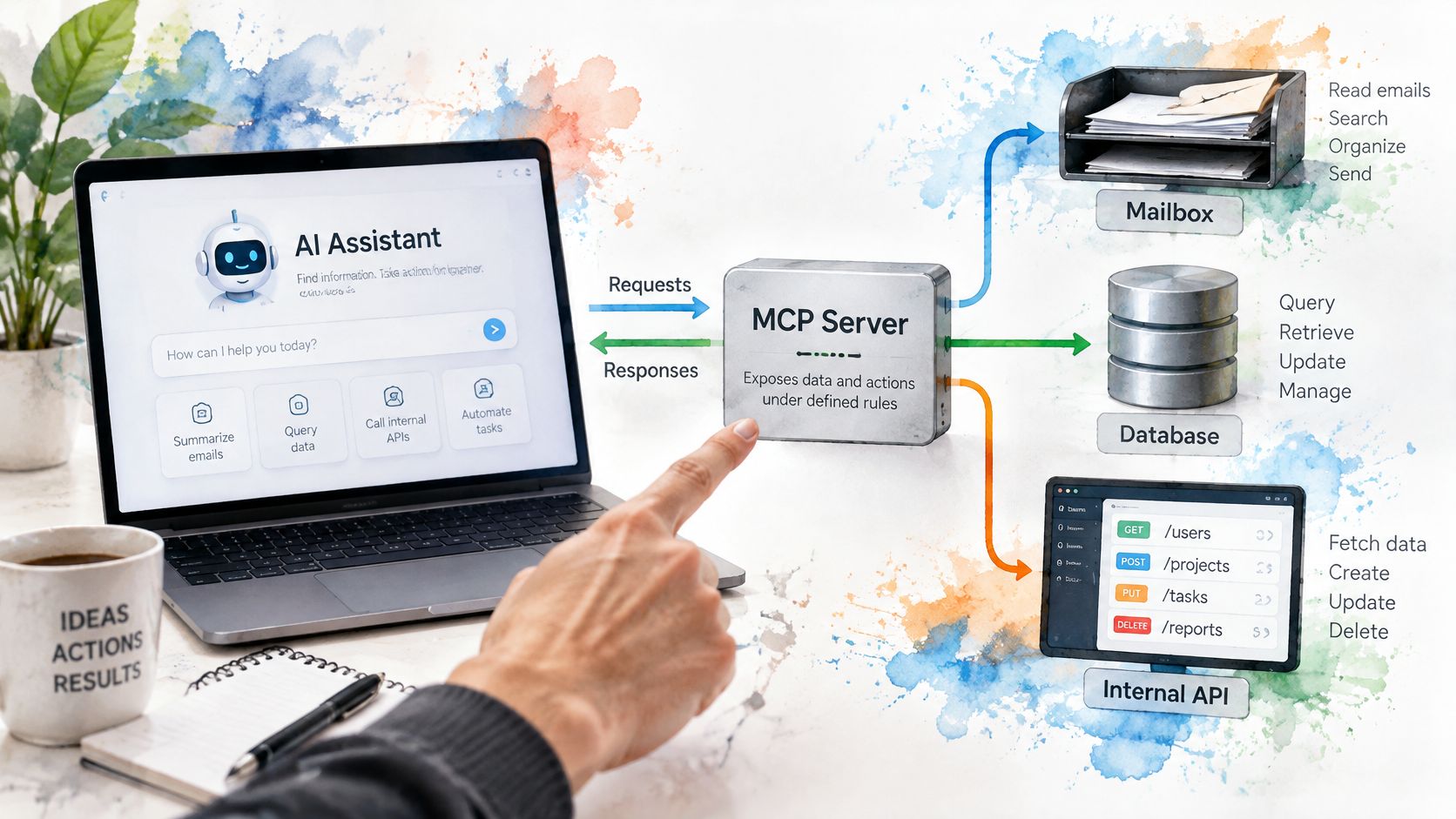
What the name actually means
Model Context Protocol is an open standard Anthropic introduced and open-sourced on November 25, 2024, alongside a specification and SDKs, local server support in Claude Desktop, and an open repository of servers, according to Anthropic's announcement. The standard is the point. One connector can serve many AI applications, instead of each application building a private integration to each system it touches.
The ecosystem moved fast once that was true. In 2025 the project reported that it had grown from a few experimental servers to thousands of active MCP servers within its first year, with more than 2,900 contributors to its community, per the MCP project's first-anniversary post. If you want the vocabulary unpacked term by term before you go further, MCP server terminology explained is a clean glossary to keep open beside this article.
Three things an MCP server is not: it isn't the AI model, it isn't a chatbot, and it isn't a hosted assistant with opinions. It's plumbing with a permission list, and most of the interesting design questions live in that permission list.
MCP Server Versus a Plain API or Plugin
Is an MCP server just an API with a newer name? Not quite, and the difference matters the moment you connect one to something you care about.
An ordinary API is built for one application's developers. Each app that needs it writes a custom integration: its own authentication, its own error handling, its own idea of what a search request looks like. An MCP server is built to a shared open standard, so any compatible AI application that speaks the protocol can reach the same server without a bespoke integration.
The sharper difference is what the model receives. An MCP server publishes a structured catalogue of callable tools with input descriptions, accepts arguments the model generates, runs the operation against the external system, and returns the result to the host application. A plain API has no such catalogue, so the model only ever sees what a developer wired in by hand.
A vendor plugin is a third thing again. It works inside one platform's ecosystem and stops at the boundary of that platform.
| Approach | Who builds it | What it means for an AI app |
|---|---|---|
| Plain API | Built for one application's developers | Each app writes its own integration |
| MCP server | Built to a shared open standard | One server can serve many compatible AI apps |
| Vendor plugin | Built for one platform's ecosystem | Works only inside that platform |
The part the comparison hides
The catalogue is also where the risk gets introduced. Because tool descriptions arrive as text the model reads and trusts, a badly written or malicious description is a kind of instruction. The protocol defines the conversation between client and server, not the guardrails around it. Consent prompts, scope limits, rate limits and logging are decisions made by whoever builds the client and the server, not features you get by using the standard.
The Parts Behind an MCP Connection
Three roles form a chain, and they're easy to blur because you only ever see the first one.
The host is the AI application you're using, a chat assistant, a coding editor, an email app with an assistant built in. Inside the host sits the client, a connector that manages a conversation with exactly one server. The server is the adapter at the other end, the thing holding the mailbox or database access. One host can keep several client connections open at once, so a single assistant can reach a mail server and a file server in the same session without either integration being hard-coded into the assistant itself.
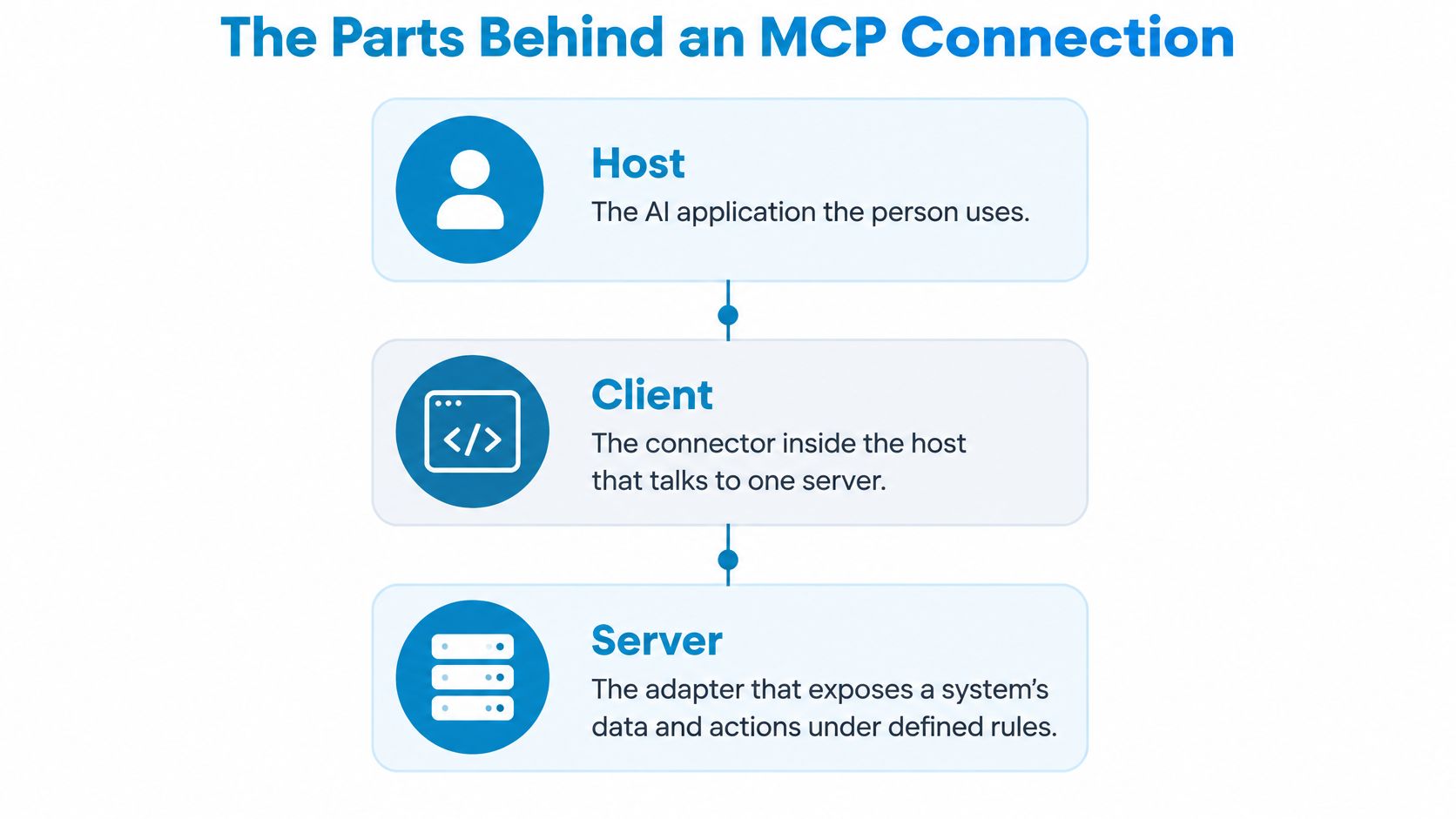
Then there are the capabilities a server can offer. The protocol's architecture documentation describes three primitives: tools as executable functions a model can invoke, such as querying a database or calling an API, resources as contextual data an application or model can use, and prompts as reusable, structured interaction templates.
Tools, resources, and who pulls the trigger
The distinction isn't cosmetic. Each primitive has a different controller. Prompts are user-controlled, resources are application-controlled, and tools are model-controlled, which is a governance model sitting right next to the technical interface.
When a client wants to know what's available, it sends a tools/list request and gets back names and input schemas. When it wants to run something, it sends tools/call for a specific tool. That's a two-stage flow, discovery and then execution, and it means an AI never gets blanket access to an underlying system. It gets an offer, and it picks from a menu.
Practical rule: if a capability can change or leak data, it should be a separately named tool with its own scope, not a hidden mode inside a harmless-looking search function.
| Term | Plain meaning | Everyday example |
|---|---|---|
| Host | The AI application the person uses | A chat or coding assistant such as Claude, Codex or Cursor |
| Client | The connector inside the host that talks to one server | One connection opened for each mailbox service |
| Server | The adapter that exposes a system's data and actions | A mail connector that reads and organises messages |
| Tool | An action the model can request | Search messages or archive a thread |
| Resource | Data the application can load as context | The text of one email thread |
| Prompt | A reusable template the user chooses | A weekly check for unanswered email |
Underneath, the parts exchange requests in JSON-RPC 2.0, and before any real work begins they negotiate capabilities, each side declaring which features it supports. Nothing assumes the other end can do something it hasn't said it can do. For a practical sense of how this maps onto real mail protocols, this explainer on how IMAP email clients work covers the provider side of the same picture.
How an Agent Uses an MCP Server Step by Step
Take one real request: "Find every client email from last week that hasn't been answered." The assistant can't run that on its own. Here's the path it takes, with the reason each check exists.
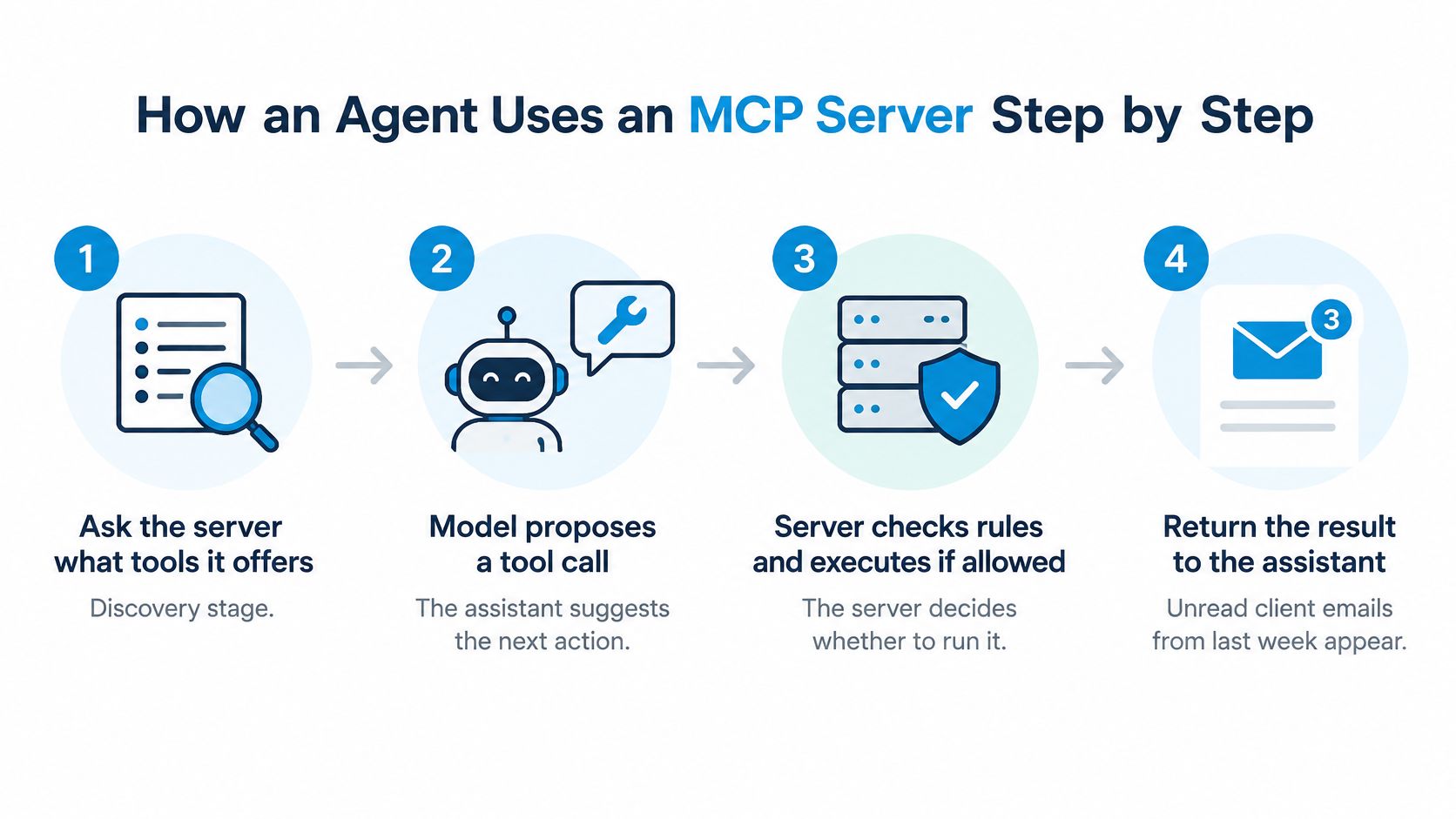
- The host asks what tools exist. The server returns its catalogue with names and input schemas. Discovery comes first so the assistant can't invent a capability that was never offered.
- The model picks a search tool and supplies arguments. It reads the schema, sees a field for a date range and a field for folder scope, and proposes a call. It's proposing, not doing.
- The host checks whether the call needs your approval. A read often proceeds without a prompt; anything destructive usually doesn't. The client, not the server, owns that question because the client is talking to you.
- The server validates the token and the scope. It confirms the request carries a token issued for this server, still valid, and allowed to read. A token minted for another service gets rejected on arrival.
- The server calls the mailbox provider. The provider returns matching messages, and the server passes back only what was asked for.
- The result returns to the host. The model summarises it in plain language, and the loop closes.
- Archiving repeats the whole cycle. Same validation, same scope check, plus a confirmation prompt if the client is configured well. Each step exists so a bad request dies at a specific, nameable point.
The formal requirements behind steps four and five are not optional garnish. The MCP tools specification calls for input validation, access controls, rate limits, output sanitisation, timeouts, and usage logging on the server side, because the server is where harm gets prevented.
Where control actually sits
The model proposes. The server executes or refuses. That single sentence answers most confusion about agents, and it's worth holding onto when marketing copy implies otherwise.
If you'd rather watch the loop once before reading further, this walkthrough covers the same discovery and execution cycle from the client's side.
A useful self-test: name the step that would stop an assistant from archiving the wrong thread. If you can point to it, you understand where your control lives. If you can't, you're trusting a promise rather than a mechanism.
Permissions That Separate Reading From Sending
An agent connection works like a set of doors with separate keys: reading your mail, reorganising it and sending new mail are different actions, and the connector should grant read, change and send separately.
| Permission | What the agent can do | Main risk | Control to look for |
|---|---|---|---|
| Read | Search, list and read messages | Private content is exposed to the assistant | Read-only scope on its own key |
| Change | Archive, label, move or mark messages | Messages get misfiled or vanish from view | Separate change scope that can be revoked |
| Send | Compose and deliver email | A message goes out under the user's name | Per-send approval prompt in the assistant's app |
| Permanent delete | Remove messages for good | Irreversible loss of correspondence | Prefer tools that archive instead, or leave this scope off |
Reading is the lowest-risk door
A read-only grant still lets a model pull message content into a conversation, and from there into summaries, follow-up prompts or other tools the same client can reach. The control to insist on is a scope that permits fetching and refuses writes, so a mistaken archive or send call fails closed.
Change should be a second key
Archiving, labelling and moving feel reversible, so the danger is drift rather than drama: a thread gets filed where you would never look, and missing mail starts to resemble deleted mail. Ask for a change scope you can revoke independently of read access, so narrowing access does not mean reconnecting from zero.
Send is the highest-stakes permission
Everything earlier can be repaired with search, labels or a restore habit. A delivered message cannot be taken back from the recipient's inbox. Look for a send tool that is marked for explicit approval, so composing and delivering are separated by a human decision in the assistant's app.
Credentials sit underneath all of this. Sickle's connector uses a scoped key rather than your password, which is the pattern to look for generally: a scoped key can be limited to read, change or send and withdrawn without touching the account password.
The protocol's authorization security guidance sets the transport bar: OAuth 2.1-aligned practices for HTTP transports, HTTPS for authorization endpoints, token validation before request processing, rejection of tokens not meant for that server, and no pass-through of the client's token to downstream services. Scope design still sits with the implementer, which is why the permission screen matters more than the logo on the connector.
Grant read first. Add change only when a named workflow needs it. Treat send as the permission you turn on deliberately, for a task you can describe out loud.
Where the Real Risk Sits and What Myths Miss
Two myths cause most of the confusion, and both are worth killing early.
Myth one: an MCP server is a small AI brain that decides things for you. A server works more like the lock on a door than the person holding the key. The model proposes a tool call and the server decides whether to execute it, checking a token, a scope and an argument shape, nothing more. No reasoning about your intent happens on that side of the boundary. Whatever the boundary was built to allow is what the assistant can do, which makes the design of that boundary the question.
Myth two: connecting through a recognised standard makes the connection safe. The protocol's own documentation argues otherwise. The MCP specification's security overview says tool descriptions and annotations should be treated as untrusted, hosts should obtain explicit consent before invoking tools, and users should understand what a tool does before authorising it. It also states plainly that MCP cannot enforce these principles at the protocol level: consent flows, access controls and data protections have to be built by the people shipping the client and the server.
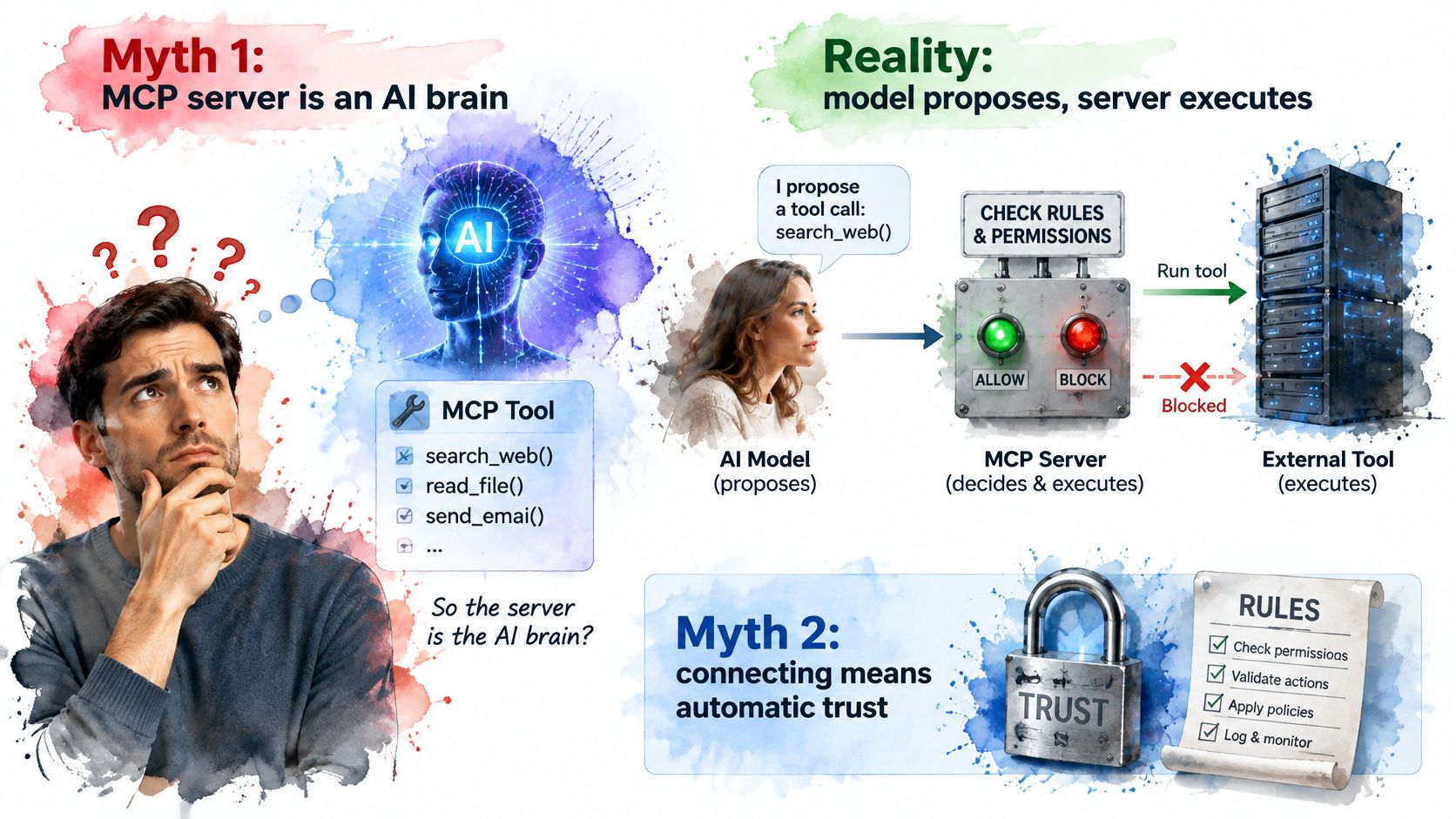
The specific failure to plan for
The attack worth planning for is prompt injection: an instruction hidden inside an email body or a document tries to steer the assistant toward an action you never requested, like disclosing message contents, invoking a write operation, or passing sensitive results into another service. Tool descriptions belong to the same problem. The assistant reads descriptive text as instructions, so a compromised or carelessly written description can push it toward a bad action from the inside, which is exactly why the specification says that text should be treated as untrusted.
Two defences follow. Treat every tool description as text that arrived from a stranger, and require consent before a tool runs rather than after. On the data side, the connector's job is to fetch only what was requested and pass back exactly that: when an assistant asks for mail through Sickle, the servers retrieve the requested items, hand them to the assistant and keep no copies. A boundary is only as good as your ability to close it afterwards, so authorisations should stay visible and revocable; connected assistants can be reviewed and revoked at sickle.app.
Security is a property of how a client and server were built, not of the word "standard" in front of their names.
For a server that runs model-written code, the boundary extends into the execution environment itself, where a bad call can do damage beyond the data it was meant to touch. Beam's guide to safe agent code execution goes deeper on sandboxing than a general overview can.
A Day With an Agent Connected to Your Email
A consultant runs three mailboxes: a personal Gmail account, a work Outlook account, and a company IMAP server that predates both. Until recently the assistant saw only what she pasted into the chat. Now all three sit behind one connector, reachable through a single scoped key rather than three separate integrations.
Tuesday morning, she asks: "Anything waiting more than five days with no reply?" The agent searches the three mailboxes at once, lists what it finds grouped by client, and drafts a reply for each thread. She edits two drafts, approves one for sending, and archives a thread that closed weeks ago. The send goes out only after her approval, because the send tool is marked so the assistant's app asks before each message leaves. Nothing was pasted, and nothing needed her laptop awake: the connector runs on Sickle's hosted server, so it works from an agent on any operating system with nothing to install. Her mailbox sign-ins live with her account, which is what lets the agent reach mail while the Mac is shut.
That last part is the key difference between a local tool and a hosted one. A desktop-only setup stops when the lid closes, and its permission boundary closes with it. A hosted connector keeps that boundary open around the clock, so whoever holds the key can keep reading, changing, or sending until the scope is narrowed or the access revoked. A connection that never sleeps deserves tighter scopes, not looser ones.
The one-connector pattern is also the common one among builders. A 2025 survey found that 58% of MCP builders were wrapping existing APIs, while 23% were creating new APIs specifically for MCP, per Zuplo's MCP survey. Most servers put a controlled front door on services that already exist rather than building new ones.
The same shape, other systems
Swap the mailboxes for a customer database, a shared drive or an internal ticketing API and the pattern holds: one catalogue of tools, one scope check per call, one place to revoke. The design question shifts from "can the agent reach the data" to "which doors did you open, and who else holds a copy of the key." If you're weighing how much of this belongs in a dedicated client rather than a chat window, this look at an email management service covers where the pieces usually sit.
Check Permissions Before You Connect an Agent
An MCP server is the controlled gateway between an AI assistant and your data. Its permissions decide what the assistant may see and what it may change. Before you connect one, walk through four checks.
- List every account the connection would cover. Include shared and delegated mailboxes, because "my account" and "the team inbox" are different exposures.
- Choose the workflow first, then the smallest permission that supports it. "Triage unanswered client mail" needs read. "Clear out newsletters" needs change. Neither needs send.
- Confirm you're handing over a scoped key, not your password. Then find where that key appears in your account settings, so revocation is a place you can go to rather than a support ticket.
- Decide the retirement case now. When a laptop is replaced or an assistant is dropped, revoke the old connection at that moment instead of leaving a key alive.
One action for this week: connect a single account with read-only access, run one real task, review the activity log, then widen access only if the result matched what you expected.
Sickle is one option here: a Mac app plus a hosted MCP server for agents such as Claude, Codex and Cursor, where adding it lets the agent search, read and tidy the mailboxes in the app. The Mac app is optional because the connector works from any operating system, and you can see and revoke your AI assistant authorisations at any time at sickle.app. If you want the workflow side first, this guide to an AI email assistant sets out what an agent can usefully do with a mailbox.
Sickle gives you both halves of this picture: a native Mac email client for Gmail, Outlook, iCloud, Fastmail and any IMAP server, and a hosted MCP server that lets Claude, Codex or Cursor search, read and tidy those same mailboxes with read, change and send permissions granted separately. You can start with read-only access on one account, watch what the agent does, and widen the scope only when a real workflow earns it. Visit Sickle to connect your first mailbox and see where the permission boundary sits.