 Sickle
Give your agent your inbox.
All of them.
Sickle connects every mailbox you own — Gmail, Outlook, iCloud, Fastmail, Yahoo, your company’s IMAP server — and hands them to Claude, Codex, Cursor or OpenClaw over MCP.
Works with any MCP client on macOS, Windows or Linux — nothing to install.
Remote. Nothing to install.
Point your agent at a URL, approve the OAuth prompt, done. No binary, no local process, no credentials pasted into a config file.
Go to Settings → Connectors, open the Add menu and choose Add custom connector, then paste the server URL. The same steps work in Claude on the web.
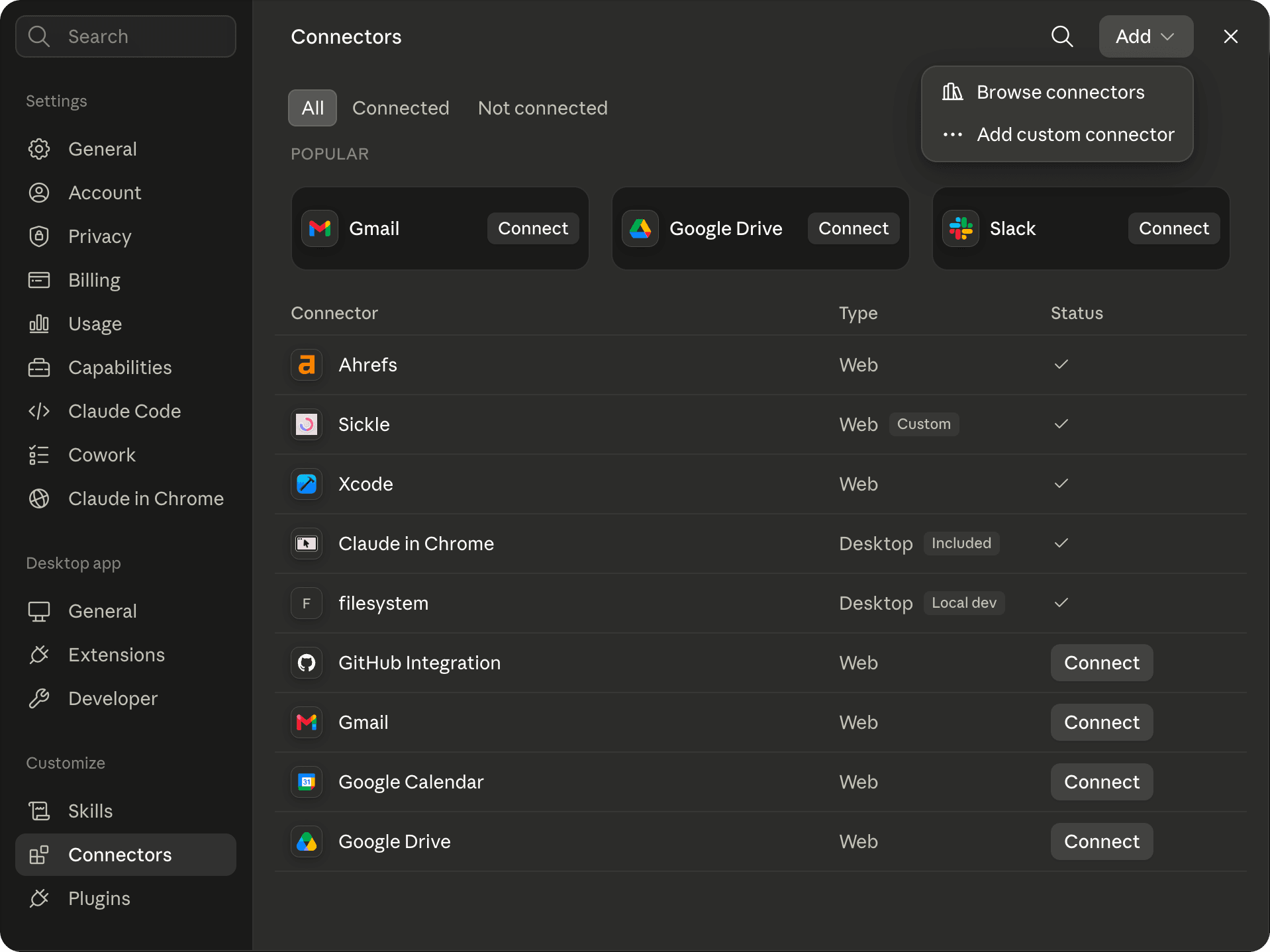
Whichever client you use, it opens a Sickle sign-in page and asks you to approve the access it wants. There are no API keys to copy across, and your assistant never receives your mailbox password — only a token you can revoke at any time.
Server status: status.sickle.app · Problems or questions: support@sickle.app
Setup guides
- Claude DesktopA custom connector in the desktop app and on the web.Read the guide →
- Claude CodeOne command, every project.Read the guide →
- CodexThe CLI, the IDE extension and the desktop app.Read the guide →
- CursorA one-click install link, or mcp.json.Read the guide →
- OpenClawYour self-hosted gateway, in every chat app.Read the guide →
You work the inbox. So does your agent.
Same accounts, same folders. When it archives something it is gone from your mail app, because there is only one mailbox.
 sickleread · change
Ask anything, or type / for commands
Every mailbox you own. Including the awkward one.
Gmail and Outlook over OAuth. Everything else with a host, a port and a password. No cap on accounts.
Your agent sees a slice of your mail and thinks it’s all of it.
Fastmail, iCloud, the company server — nothing.
It can tell you about the newsletter. It can’t archive it.
Most email connectors authenticate a single Gmail account. Sickle connects as many mailboxes as you have and hands your agent all of them at once — every provider with an IMAP port, read, change and send.
 GmailOAuth
 Outlook / 365OAuth
 iCloudapp password
 Fastmailapp password
 Yahooapp password
 Any IMAP hostmanual
Your agent, working your mail.
One job per card, with the tools it calls. Hover one to watch it happen.
One question, every account. Results come back with the mailbox they live in.
- LedgerlyworkInvoice LG-0314 · March2 Apr
- Hopper & VinepersonalYour March order receipt31 Mar
- Marta OyelaranworkRe: March invoice — brand refresh28 Mar
- Quillbury BookspersonalBook club · March invoice3 Mar
Not the preview — the conversation, and the line in it that matters.
Mark, move, archive. It works the same folders you do.
- Eleanor HughesRe: SOW v3
- Deskly14 notifications
- Hopper & VineWebinar: Omnichannel…
- Gradient Weekly37 links
Read, change and send — each granted per client.
Your agent wants to use your mail- Reademail_read
- Changeemail_change
- Sendemail_send
Trash means your Trash folder. Sending is its own permission.
Disconnect a client and its access ends within the hour.
- CClaude Desktopread · changeDisconnect
- CCursoraccess endedDisconnected
- CCodexread · changeDisconnect
Email is untrusted input. Anyone can send you a message, and an assistant reading your mail will also read any instructions hidden inside it. Grant email_change and email_send only to clients you trust, review what your assistant proposes before approving it, and read every email before you let it go.
Sickle, Google’s Gmail MCP and the rest.
Five ways to give an agent your email, including where Sickle loses.
| Sickle | Google’s Gmail MCPDeveloper Preview | Claude’s connectorsGmail, Microsoft 365 | Superhuman Mail MCP | Open sourcetaylorwilsdon/google_workspace_mcp | |
|---|---|---|---|---|---|
| Providers | SickleGmail, Outlook, iCloud, any IMAP | Google’s Gmail MCPGmail (Workspace) | Claude’s connectorsGmail, Microsoft 365 work | Superhuman Mail MCPGmail, Outlook | Open sourceGmail |
| Several accounts at once | Sickleyes, no cap | Google’s Gmail MCPno | Claude’s connectorsnot documented | Superhuman Mail MCPyes | Open sourceyes |
| Read | Sickleyes | Google’s Gmail MCPyes | Claude’s connectorsyes | Superhuman Mail MCPyes | Open sourceyes |
| Change (archive, move, label) | Sickleyes | Google’s Gmail MCPlabels only | Claude’s connectorslabels; M365 needs an admin | Superhuman Mail MCPyes | Open sourceyes |
| Send | Sickleyes, opt-in | Google’s Gmail MCPno — drafts only | Claude’s connectorsyes; M365 needs an admin | Superhuman Mail MCPyes | Open sourceyes |
| Auth model | SickleOAuth; app passwords for iCloud and IMAP | Google’s Gmail MCPyour own Google Cloud project | Claude’s connectorsGoogle or Microsoft OAuth | Superhuman Mail MCPOAuth | Open sourceyour own OAuth client |
| Hosted or local | Sicklehosted by Sickle, a third party | Google’s Gmail MCPhosted by Google | Claude’s connectorshosted by Anthropic | Superhuman Mail MCPhosted by Superhuman | Open sourcelocal |
| Works in | Sickleany MCP client | Google’s Gmail MCPClaude, Antigravity, others | Claude’s connectorsClaude only | Superhuman Mail MCPClaude, ChatGPT, Cursor, more | Open sourceany MCP client |
| Revocation | Sickleat sickle.app, within the hour | Google’s Gmail MCPGoogle Account | Claude’s connectorsClaude, Google or Entra | Superhuman Mail MCPin your client | Open sourceGoogle Account |
| Prompt-injection stance | Sicklewarns; send is separate | Google’s Gmail MCPscreen it yourself | Claude’s connectorsnot documented | Superhuman Mail MCPnot documented | Open sourcewarns; read-only mode |
| Open source | Sickleno | Google’s Gmail MCPno | Claude’s connectorsno | Superhuman Mail MCPno | Open sourceyes, MIT |
| Price | Sickle$8.99/mo, 7 days free, or $30/yr | Google’s Gmail MCPfree in preview | Claude’s connectorsin your Claude plan | Superhuman Mail MCP$33/user/mo, yearly | Open sourcefree |
Sources
- Sickle
- Tools, permissions, revocation and prompt-injection guidance: Sickle — Connect AI assistants to your email
- Providers and how each signs in: How your mailboxes get there without the app
- What passes through Sickle and what is kept: Privacy Policy
- Price and trial: Pricing
- Google’s Gmail MCP server
- Developer Preview, tools, hosted endpoint, one account per connection: MCP Reference: gmailmcp.googleapis.com
- Setup, scopes, drafts only, clients: Configure the Gmail MCP server
- Programme membership and Workspace account: Google Workspace Developer Preview Program
- Prompt and response screening: Configure security for Google Workspace MCP servers
- Price and quota: Usage limits | Gmail
- Revocation: Manage third-party apps & services with access to your account
- Claude’s connectors
- Gmail: plans, one account, labels, drafts, sending, revocation: Use Google Workspace connectors
- Microsoft 365: plans, work accounts only, write actions: Microsoft 365 connector
- Microsoft 365: admin consent: Set up the Microsoft 365 connector
- Microsoft 365: hosted by Anthropic, revocation in Entra ID: Microsoft 365 connector security guide
- Claude Code uses connectors from claude.ai: Connect Claude Code to tools via MCP
- Superhuman Mail MCP
- Plans, providers, accounts, tools, sending, hosting, clients, revocation: Superhuman Mail MCP Server
- Price: Superhuman Mail | Pricing & Plans
- Public repository contents: superhuman/mcp-mail
- Open source (taylorwilsdon/google_workspace_mcp, the most-starred maintained Gmail MCP server; representative of the type)
- Transport, own OAuth client, send, labels, several accounts, prompt injection, licence: Google Workspace MCP Server — README
- Token file location: auth/google_auth.py
How your mailboxes get there without the app.
The connector serves whatever mailboxes your Sickle account holds. You add them on the web, once, and every agent you connect sees all of them.
- 01Sign in at sickle.app.
The same account your agent will sign in to when you approve it.
- 02Open Mailboxes, choose Connect mailbox.
One dialog, one provider at a time.
- 03Pick the provider.
Gmail and Google Workspace, Outlook, Hotmail and Live sign in with OAuth in your browser. iCloud, Yahoo and Mail.ru take an app password. Anything else takes a host, a port and a password.
- 04Repeat for the second and the third.
There is no cap. An agent that is already connected sees the new mailbox the next time it calls list_accounts — nothing to reconnect.
It comes with a native Mac mail client.
Every mailbox in one window, a colour per account, an email cleaner and Vim keys. Same mailboxes. Whatever the agent archives is gone from the app, because there is only one inbox.
See the Mac appOne subscription. No Mac needed.
The connector is included in the same subscription as the Mac app — not a separate add-on — and it works from any OS.
See pricingAsked before you ask.
Which agents work?
Claude Desktop and Claude on the web, Claude Code, Codex, Cursor, OpenClaw — and any other client that can add a remote MCP server over HTTP. How it compares with the other ways in →
How is Sickle different from Google’s Gmail MCP server?
Google’s server is free and run by Google, so your mail never passes through anyone else, but it is a Developer Preview: it needs a Workspace account, programme membership and your own Google Cloud project, it covers one Gmail account per connection, and it can draft but not send. Sickle is a paid service in the middle that serves every mailbox you own — Gmail, Outlook, iCloud, Yahoo, Fastmail or any IMAP server — through one connection, and it can move, archive and, if you allow it, send. See the full comparison →
Do I need the Mac app to use the connector?
No — the app is optional, and the connector works from any OS. Sign in at sickle.app and add your mailboxes there: Gmail, Outlook, iCloud, Yahoo or any IMAP server. The connector signs in with the same account, so your agent sees every mailbox you add, on the web or in the app.
Can it send email as me?
Yes, if you allow it. Sending is its own permission, email_send, granted separately from reading and changing, so you can leave it off. With it on, apps like Claude and Cursor ask you to approve each email before it goes, and the request holds the whole message. With it off, an assistant can still save a draft in your Drafts folder for you to send yourself.
Can my agent attach files?
Yes, to drafts and to emails it sends. A file already in one of your emails can be attached by any agent, Claude on the web included: ask it to attach that invoice, and it takes the file straight from the email, even into a message from another of your accounts. For a file on your computer, the agent uploads it to a one-time link, so it never passes through the conversation. Agents that can run a command — Claude Code, Codex, Cursor, OpenClaw — do this as they are; in Claude Desktop, let its code execution reach mcp.sickle.app by adding it to the allowed domains. Files can be up to about 18 MB, and 25 MB together once encoded for email. Each file is encrypted while it waits and deleted as soon as the draft is saved or the email sent.
Can my agent open an attachment?
Yes, if it can run a command, as Claude Code, Codex, Cursor and OpenClaw can, or Claude Desktop with mcp.sickle.app allowed in its code execution. It asks for a one-time link and downloads the file to work on it with its own tools: read a PDF, open a spreadsheet. The link works once, for five minutes, and whoever has it can fetch the file, so it should go nowhere but the command that downloads it.
Do you store my email?
Your agent never receives your mailbox password — only a token you can revoke. The connector reads from your mail server when your agent asks and passes the result on; it does not keep a copy of your mailbox. A file your agent attaches or downloads is the one thing held, encrypted, until the draft is saved, the email sent or the file downloaded, and for no more than a day.
My company runs its own mail server. Does it work?
Yes. Anything with an IMAP host, a port and a password.
More than one account?
As many as you have, in one window and through one agent connection. There is no cap on accounts.
How do I revoke an agent?
Sign in to sickle.app, open Connect AI, and disconnect it under Connected assistants. Access it already holds ends within the hour.
What if an email tries to give my agent instructions?
It might. Email is untrusted input, and an assistant reading your mail reads whatever is in it. That is why changing and sending are separate permissions, why the only thing an assistant can’t undo is a send, and why you should read what it proposes — every email above all — before approving it.
Windows, Linux or iOS?
The connector is not tied to an OS — it runs on our server, so any agent that can add a remote MCP server can use it, wherever that agent runs. Only the mail app is macOS only.
Is the connector included in the subscription?
Yes. One subscription covers the Mac app and the agent connector; the connector is not a separate add-on.